This is Part 1 of the “Automate Your Life with Claude AI” series __ where we show you how one AI tool can replace hours of manual work across different platforms.
Staying active on LinkedIn, writing good posts, keeping your profile updated, applying to jobs, and managing conversations __ all of this takes so much time that there’s barely any left for actual work. AI, especially Claude, can take most of this off your plate.
But here’s something important most articles don’t tell you: there are actually two different ways to automate LinkedIn with Claude __ one for beginners (simple, free, no technical skills needed) and one for advanced users (semi-automatic, technical setup, often paid). This guide covers both, so you can pick the one that fits you.
Method 1: The Beginner Way (Manual + Claude)
This is the easiest way to start, and it works for anyone __ no coding, no extra tools, no cost beyond a free Claude account. Here, Claude does the thinking and writing, and you do the posting.

- Optimize your profile (Headline + About Section)
Give Claude your job title, skills, and goal:
“I’m a [profession] with [X years] of experience, and I want to use LinkedIn for [jobs/clients/networking]. Write me a professional LinkedIn headline and About section.” - Build a Content Calendar
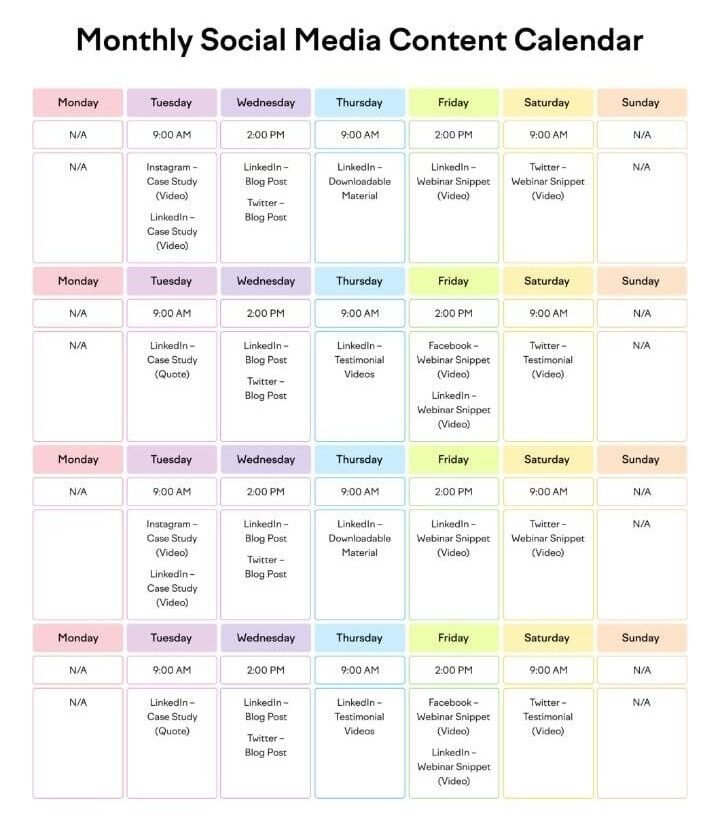
“Create a 30-day LinkedIn content calendar for [your niche]__ one post idea and caption per day.”
Copy, paste, and publish whenever you’re ready. - Tailor Job Applications
“Here’s a job description: [paste it]. Here’s my resume: [past it]. Tailor my resume and write a matching cover letter.” - Write Networking Messages
“I want to connect with [person] who works as [role]. Write a short, genuine connection message.” - Prep for Interviews
“Give me 10 likely interview questions for this role and help me answer them well.”
You save hours of thinking and writing time, but you still click “post” and “send” yourself. This is the safest and most reliable starting point.
Method 2: The Advanced Way (semi-Automated with Bridge Tools)
Here’s the part most people misunderstand: there’s no direct “Connect Claude to LinkedIn” Button. LinkedIn tightly controls its API, and Anthropic has no official LinkedIn partnership. So true automation __ where Claude works in the background without you clicking anything __ isn’t possible on its own.
What advanced users actually do is connect Claude to LinkedIn through a bridge tool__ an automation platform that already has access to LinkedIn, and lets Claude plug into it.
How this generally works:
- Pick a bridge platform__ tools like Zapier, n8n, or Make can connect Claude’s API to other apps and trigger actions automatically.
- Connect your LinkedIn account to that platform (through their supported integration __ LinkedIn doesn’t allow open API access to everyone, so most platforms use official partner connections).
- Build a workflow __ for example:
“when someone sends a new connection request __ sent it to Claude __ Claude drafts a reply __ the reply gets sent (or held for your approval).” - Set rules for human approval
LinkedIn actively detects and restricts bot-like, fully automatic activity. Because of this, most reliable setups keep a human “approve before sending” step, especially for posting and messaging.
What this method is good for:
- Automatically drafting replies to comments or messages
- Pulling LinkedIn engagement data for Claude to analyze
- Speeding up outreach at scale (with a review step)

What to keep Mind:
- This setup takes technical know-how (or a lot of patience) to configure
- Most bridge tools are paid, especially at higher usage
- Fully “hands-off” automation isn’t realistic __ LinkedIn’s spam detection makes some human oversight necessary to keep your accout safe
Which Method Should You Use?
| Beginner Method | Advanced Method | |
| Setup time | 5 Minutes | Hours (technical) |
| Cost | Free | often paid (bridge tools) |
| Skill needed | None | Basic automation/tech knowledge |
| Control | Full Manual Control | Semi-automatic, needs monitoring |
| Best For | Individuals, job seekers, beginners | Recruiters, agencies, high-volume outreach |
If you’re just starting out __ or you’re an individual managing your own profile __ stick with the beginner method. It’s simpler, safer, and still saves you most of the time. The advanced method makes more sense once you’re managing LinkedIn at scale (for a business, agency, or recruiting pipeline)
What’s Next
Now you know both the simple and the advanced way to automate LinkedIn using Claude. In the next article, we’ll cover:
We’ll show you how to Automate Email Using Claude — writing cold emails, replies, and follow-ups in minutes.